Most clinics begin with ready-made software, and for many that is the right call. But some practices reach a point where the tool they bought no longer matches the way they work. A multi-branch skin clinic wants one central report. A physiotherapy centre needs to track session packages. A growing practice wants its own patient app. At that stage the question changes from which software to buy to what should be built.
This guide is for clinic owners, healthcare founders and IT heads considering custom clinic management software development. It covers the modules worth scoping, how Android, Windows and iOS options differ, what to plan for privacy, and how a project usually moves from idea to launch.
When Custom Software Makes Sense
Ready-made clinic software is quicker to start and often cheaper in year one. Custom development is worth a serious look when:
- Your workflow is different from the standard OPD pattern, for example package-based treatments, repeat sessions or specialty-specific records.
- You run several branches and need a single view across them.
- You want your own branded patient app rather than a listing on someone else's platform.
- You need to connect with existing labs, payment tools or in-house systems.
- You expect to grow and do not want to change platforms again in two years.
If none of these applies, a ready-made product is usually the practical answer. A good development partner will say so honestly.
Core Modules to Scope
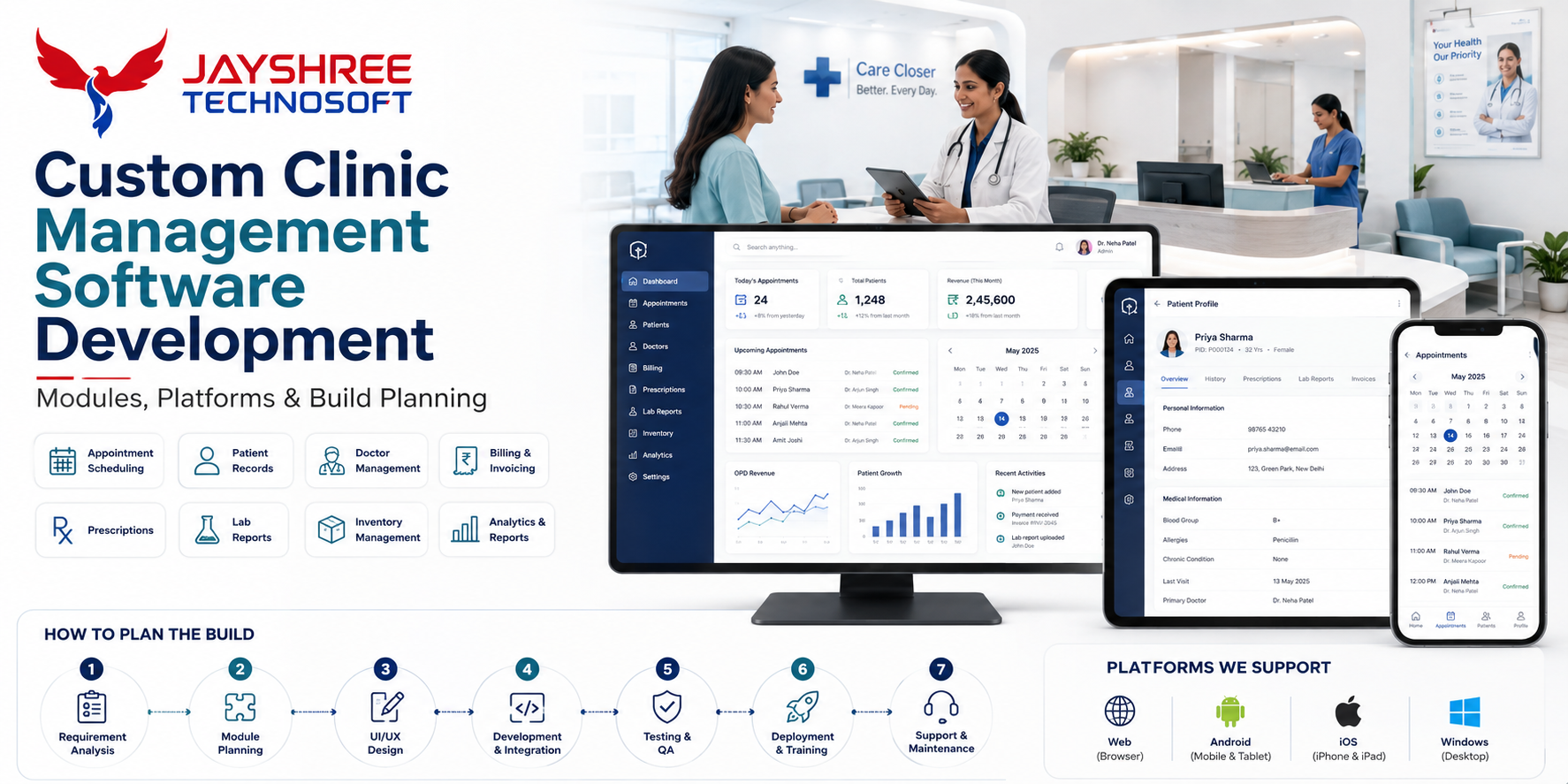
You do not need every module on day one. These are the building blocks most clinic projects start from:
- Patient registration and records: demographics, visit history, notes and attachments.
- Appointments and queue: doctor calendars, walk-ins, token display and waitlists.
- Consultation and prescriptions: structured notes and prescription templates.
- Billing and invoicing: consultation fees, procedures, packages, discounts, partial payments and receipts.
- Pharmacy and inventory: stock, batch and expiry tracking.
- Reports and dashboards: daily collections, doctor-wise visits and pending dues.
- Users and permissions: separate roles for doctor, receptionist, accountant and admin.
- Patient communication: reminders and follow-ups through SMS or WhatsApp, where an approved provider is integrated.
- Telemedicine and patient portal: video consultation and report access, if your practice needs them.
A phased build that starts with registration, appointments and billing is easier to test, easier to train staff on, and easier to fix when real usage shows what was missing.
Choosing Platforms: Android, iOS, Windows and Web
The platform decision affects cost and timeline more than most owners expect. Jayshree Technosoft lists web, Android and iPhone development among its services, so the options below describe what a software company of this kind can build, not a ready product.
Android App
Useful for doctors and owners who move between rooms. It can be built natively with Kotlin or with cross-platform tools such as Flutter or React Native, both of which appear in the company's listed technologies. Android is often the first mobile platform in India because of its wide use.
iOS App
Built with Swift or the same cross-platform tools. It matters if your doctors or patients mainly use iPhones. Plan time for App Store review in the schedule.
Windows
Reception and billing desks usually run Windows PCs. A Windows-ready system can be delivered as a web application opened in a browser, or as an installable desktop app. The right choice depends on printer use, offline needs and how your staff work. The Jayshree Technosoft website does not list a separate Windows desktop service, so confirm this option during discovery.
Web Portal and Admin Panel
A web portal lets the owner see reports from anywhere and usually acts as the base the mobile apps connect to. Listed front-end technologies include React.js, Next.js, Angular and Vue.js. Back-end options include Node.js, Laravel, PHP and Python, with MySQL or MongoDB for data.
In short, Android suits doctors, owners and a patient app, but plan for different phone models and a Play Store release. iOS suits doctors and patients who use iPhones, and you should allow time for App Store review. Windows is best for reception and billing counters, where printers and offline use need planning. A web portal works well for admin work, reports and remote access, and needs a proper browser and security set-up.
A few early decisions save a lot of rework later:
- One backend, many screens. A single API serving Android, iOS, Windows and web keeps data consistent across devices.
- Role-based access. A receptionist should not see everything a doctor or owner can see.
- Encryption and backups. Protect data in storage and in transit, and test restoring backups, not just taking them.
- Cloud hosting. The company lists AWS, Azure and GCP; the right one depends on cost, location and support needs.
- Offline behaviour. Clinic internet fails sometimes. Decide which tasks must keep working without a connection.
- Audit trail. Record who viewed or changed a patient record.
- Data migration. Plan how old spreadsheets or previous software records will move into the new system.
Privacy and Compliance Planning
Patient data is among the most sensitive information a business can hold. In India, planning should consider the Digital Personal Data Protection Act, 2023, applicable medical record guidelines and any rules from your medical council or insurers. Jayshree Technosoft's website mentions healthcare work such as telemedicine portals, patient tracking apps and clinic management portals. Any specific compliance requirement for your project should be confirmed during discovery and with your legal advisor. No software can promise compliance by itself; it depends on how the system is configured and used.
How a Clinic Software Project Usually Runs
Jayshree Technosoft describes a five-step delivery framework. Applied to a clinic, it looks like this:
- Discovery and Analysis: map how patients move through your clinic and talk to doctors, reception and accounts staff.
- Premium Designing: design simple screens for each role. Front-desk staff need speed, not decoration.
- Development: build in phases so you can review working modules early.
- Testing and QA: test real situations such as double bookings, partial payments, refunds and wrong entries.
- Launch and Support: train staff, go live in stages and monitor after launch.
You can read more on the company's How We Work page.
Three Illustrative Scenarios
These are examples, not client case studies.
- Two-doctor general clinic: Windows at reception, an Android view for doctors and a web dashboard for the owner.
- Multi-branch skin and hair clinic: one central patient database, branch-wise reports and treatment package tracking.
- Physiotherapy centre: session packages, therapist schedules, attendance and reminder messages.
Questions to Ask Before Hiring a Development Partner
- Will you map our workflow before quoting?
- Which platforms will you build first, and why?
- How will patient data be protected and who can access it?
- Can we launch in phases and review each one?
- Who owns the source code and the data?
- What support and training follow the launch?
What Affects Cost and Timeline
Pricing depends on the number of modules, the platforms chosen, integrations, data migration and how much design work is needed. Any fixed number given before discovery is a guess, so ask for a scoped estimate instead.
Conclusion
Custom clinic software is not for every practice, but when your workflow, branches or patient experience have outgrown a standard product, it can be the cleaner long-term answer. Start with the modules that matter most, choose platforms according to how your staff really work, and plan privacy from the first meeting.
If you are considering a build, talk to Jayshree Technosoft LLP about your requirements. Explore the web development, Android development and iPhone development services, or contact the team to discuss your clinic project.
L. Five FAQs
1. Should I build custom clinic software or buy a ready-made product? Buy if your workflow is standard and you want to start quickly. Build if you have unusual workflows, several branches, a branded patient app or special integrations.
2. Can clinic software be built for Android, iOS and Windows together? Yes, it can be planned that way. A shared backend can serve all platforms. Windows can be delivered as a web app or an installable app, which should be decided during discovery.
3. How long does it take to build clinic management software? It depends on the modules and platforms. A phased approach, starting with registration, appointments and billing, lets you go live earlier and add modules later.
4. How is patient data kept safe in custom software? Through role-based access, encryption, backups, audit trails and careful hosting choices, planned together with your legal advisor for applicable Indian rules.
5. What should I prepare before meeting a development company? List your daily workflow, the staff roles, the devices in use, your current software or spreadsheets and the problems you most want solved.
Clinic Management Software Development, Custom Clinic Software, Healthcare CRM Development, Clinic App Development, Appointment Booking App, Android Clinic App, iOS Healthcare App, Healthcare Software India, Patient Management System, Custom Software Company Jaipur, Jayshree Technosoft
#CustomSoftwareDevelopment #ClinicManagementSoftware #HealthcareIT #JayshreeTechnosoft #AppDevelopment
Recent Articles
Custom Real Estate CRM and Property Software Development: Features, Platforms and Planning Guide
Custom Law Firm CRM and CA Practice Software Development: A Planning Guide
Repair Shop Management Software Development: Modules, Platforms and Planning Guide